Connections
Forwarding marketplace e-mails to Kupylo
A personal profile address for marketplace e-mails: orders, payments, shipments and tracking numbers arrive on their own, even when the extension did not collect.
How to do it
In "Connections", in the profile card: "+ Add service" → "E-mail" (A) → "Connect e-mail"
The profile is the card: you do not pick it separately. The form opens right there
Copy the address (A) with the "Copy" button (B)
The address is personal: e-mails to it go only to this profile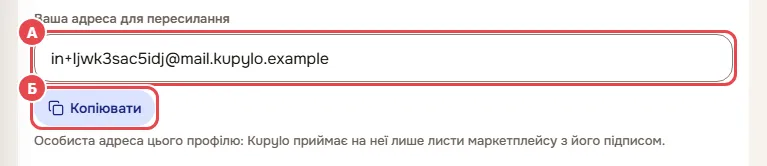
Gmail on a computer: the gear at the top right (A) → "See all settings" (B) → "Forwarding and POP/IMAP" (C) → "Add a forwarding address" (D)
Paste the address → "Next" → "Proceed" → "OK"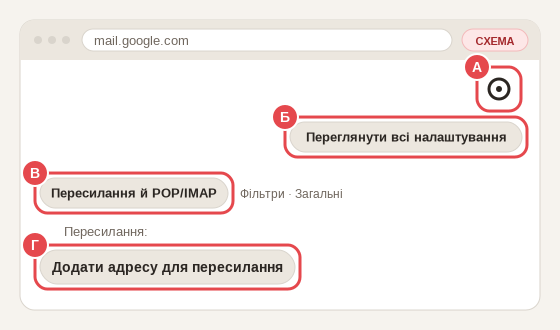
Scheme of the screen, not the real look of the site The confirmation code shows up in Kupylo (A) — press "Confirm in Gmail" or enter the code in Gmail
You do not need access to the Kupylo address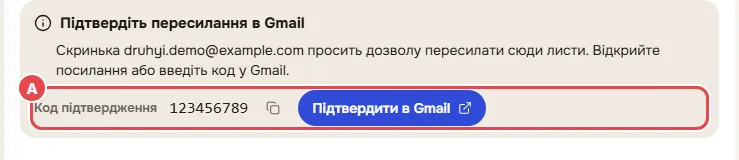
Create a filter: in Gmail search — from:(aliexpress.com) (A) → "Create filter" (B) → "Forward it to" your Kupylo address (C)
Do not switch on "Forward a copy of incoming mail" for all mail — only the filter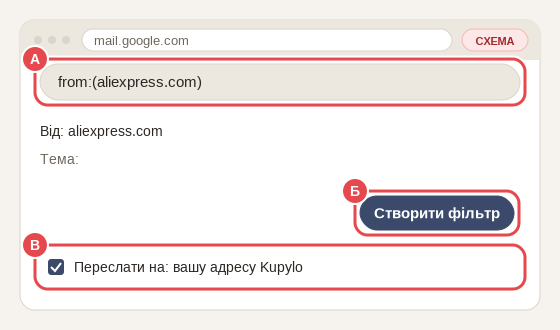
Scheme of the screen, not the real look of the site In the marketplace account switch on e-mails about orders and shipping
The menu items are roughly "Settings" → "Notifications"Wait for the first e-mail — the profile card shows "1 e-mail received"
Links and steps checked on 15 November 2026
Ready to connect?
Sign in to Kupylo — the key goes into Connections, and Kupylo keeps everything up to date from there.