Connections
Meest: API access
Meest gives API access under a contract — to online shops, sole traders and companies.
How to do it
Sign in to the Meest cabinet
24.meest.comSign the contract under «Налаштування договорів» (Contract settings)
Qualified e-signature or Diia.Pidpys; the manager confirms itAsk your Meest manager for API access
Meest does not publish a menu item for thisIn Kupylo: "Connections" → your profile card → "+ Add service" → Meest (A)
The profile is the card: you do not pick it separately. The form opens right there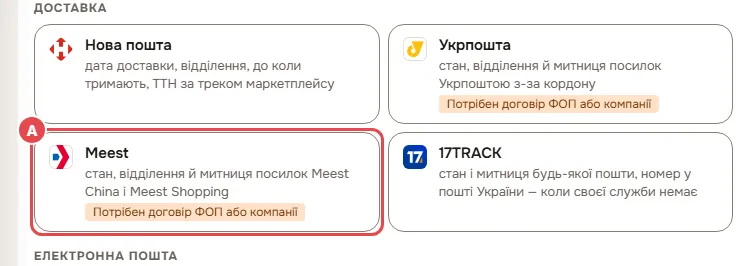
Paste the API login (A) and password (B) and press "Check and save" (C)
The cabinet says in words whether the access works and how many parcels it found; the data stays only in this browser — add it separately on the phone and on the PC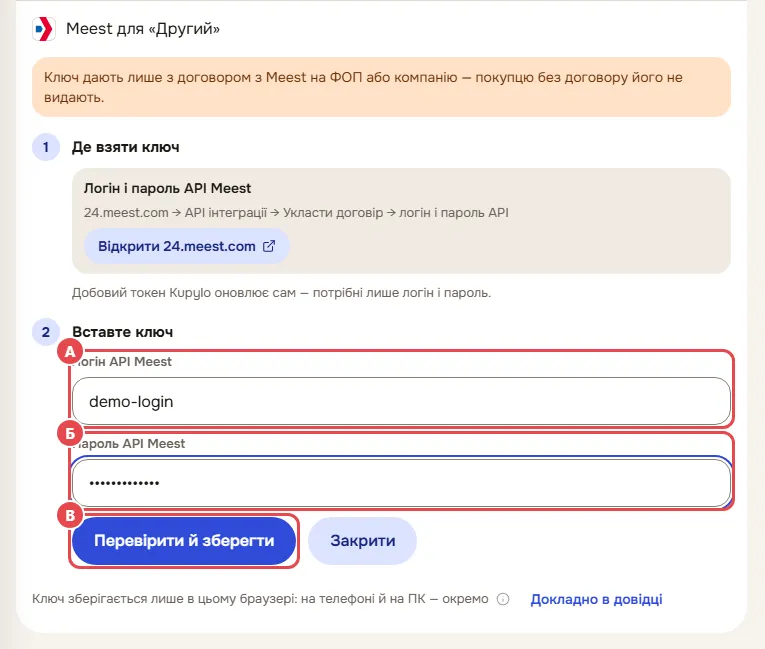
Links and steps checked on 15 November 2026
Ready to connect?
Sign in to Kupylo — the key goes into Connections, and Kupylo keeps everything up to date from there.