Connections
17TRACK: API key
17TRACK sees parcels of most carriers worldwide. Anyone can get a personal key.
How to do it
Sign up at api.17track.net
Free. New accounts get 200 numbers onceSign in, open Settings (A) and copy the Security Key (B)
Do not press Change Key: it issues a new key and the old one stops working within 5 minutes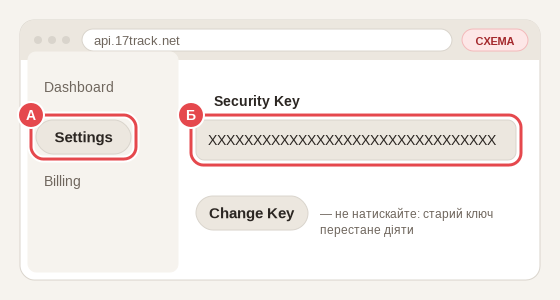
Scheme of the screen, not the real look of the site In Kupylo: "Connections" → your profile card → "+ Add service" → 17TRACK (A)
The profile is the card: you do not pick it separately. The form opens right there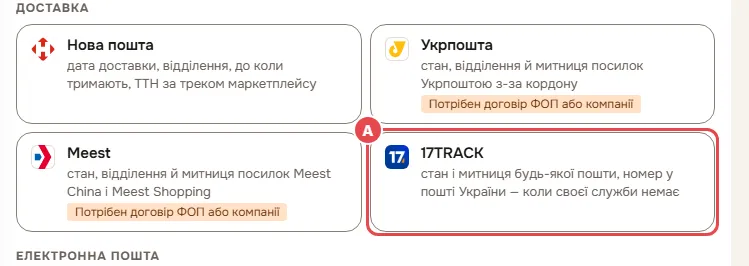
Paste the key into the "17TRACK API key" field (B) and press "Check and save" (C)
To paste: click the field and press Ctrl+V (Cmd+V on a Mac). Button A opens the 17TRACK site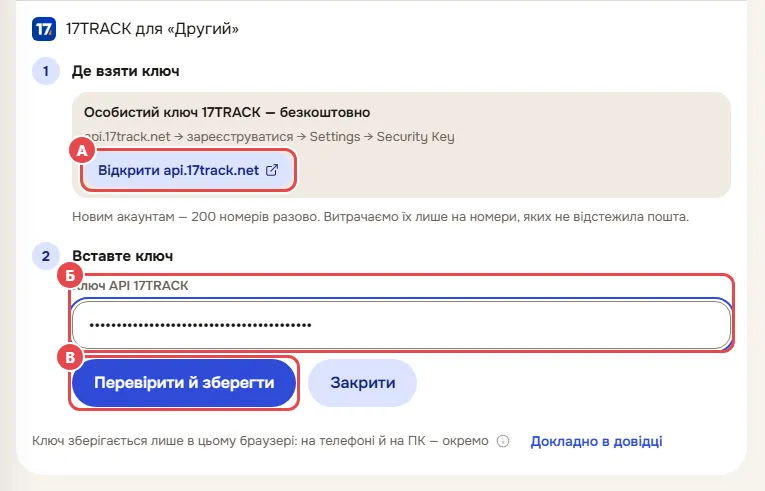
The cabinet says in words whether the key works and how many parcels it found
The key stays only in this browser — add it separately on the phone and on the PC17TRACK stops watching a parcel with no events for 30 days or 15 days after delivery
That is how 17TRACK itself works
Links and steps checked on 15 November 2026
Ready to connect?
Sign in to Kupylo — the key goes into Connections, and Kupylo keeps everything up to date from there.