Connections
Ukrposhta: tracking key
Ukrposhta issues a tracking API key only under a contract — for a sole trader or a company.
How to do it
Sign a contract with Ukrposhta as a sole trader or a company
Business portal — dev.ukrposhta.uaAsk your manager for the status tracking API keys
Ukrposhta says the bearer and token are issued by your manager after signingCopy the tracking key (bearer)
In Kupylo: "Connections" → your profile card → "+ Add service" → Ukrposhta (A)
The profile is the card: you do not pick it separately. The form opens right there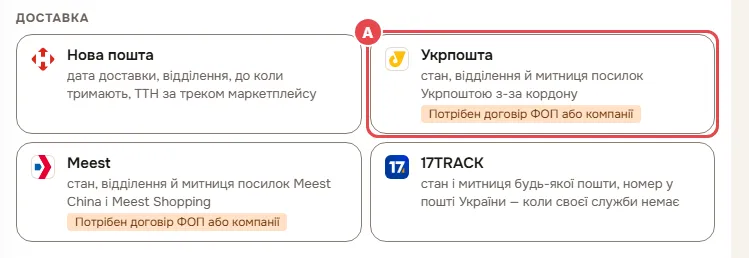
Paste the key into the "Ukrposhta tracking key" field (B) and press "Check and save" (C)
The cabinet says in words whether the key works and how many parcels it found; the key stays only in this browser — add it separately on the phone and on the PC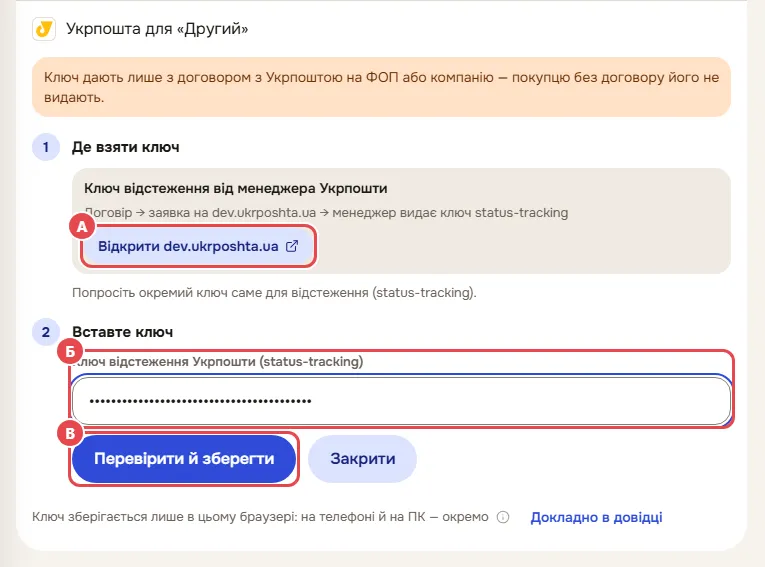
A parcel shows up in tracking once it is registered at a branch
That is how Ukrposhta works
Links and steps checked on 15 November 2026
Ready to connect?
Sign in to Kupylo — the key goes into Connections, and Kupylo keeps everything up to date from there.